
The short version
- For most UK small and medium retailers, Shopify is the best ecommerce platform for SEO: it gets the technical basics right and leaves you free to work on products and content.
- WooCommerce gives you the most control and the best blogging, but someone has to look after hosting, updates and speed.
- BigCommerce and Adobe Commerce suit bigger, more complex catalogues. Squarespace and Wix suit small ranges where the brand matters more than the size of the catalogue.
- No platform ranks a store on its own. Category pages, product content, speed and links decide where you appear.
- If you’re switching platforms, the redirect plan matters more than which platform you move to.
Google doesn’t rank a store higher because it runs on Shopify or WooCommerce. What the platform decides is how much control you have over the things that do affect rankings, such as URLs, page titles, duplicate pages, speed and structured data, and how much work it takes to get them right.
So the short answer is Shopify for most retailers, WooCommerce if you want full control and have someone to maintain it, and the others for particular situations. The rest of this guide explains why, platform by platform, so you can test that answer against your own business.
What makes an ecommerce platform good for SEO
Every serious platform now covers the basics. The differences show up in the detail, and in how much a non-technical owner can manage without calling a developer.
Control over each page
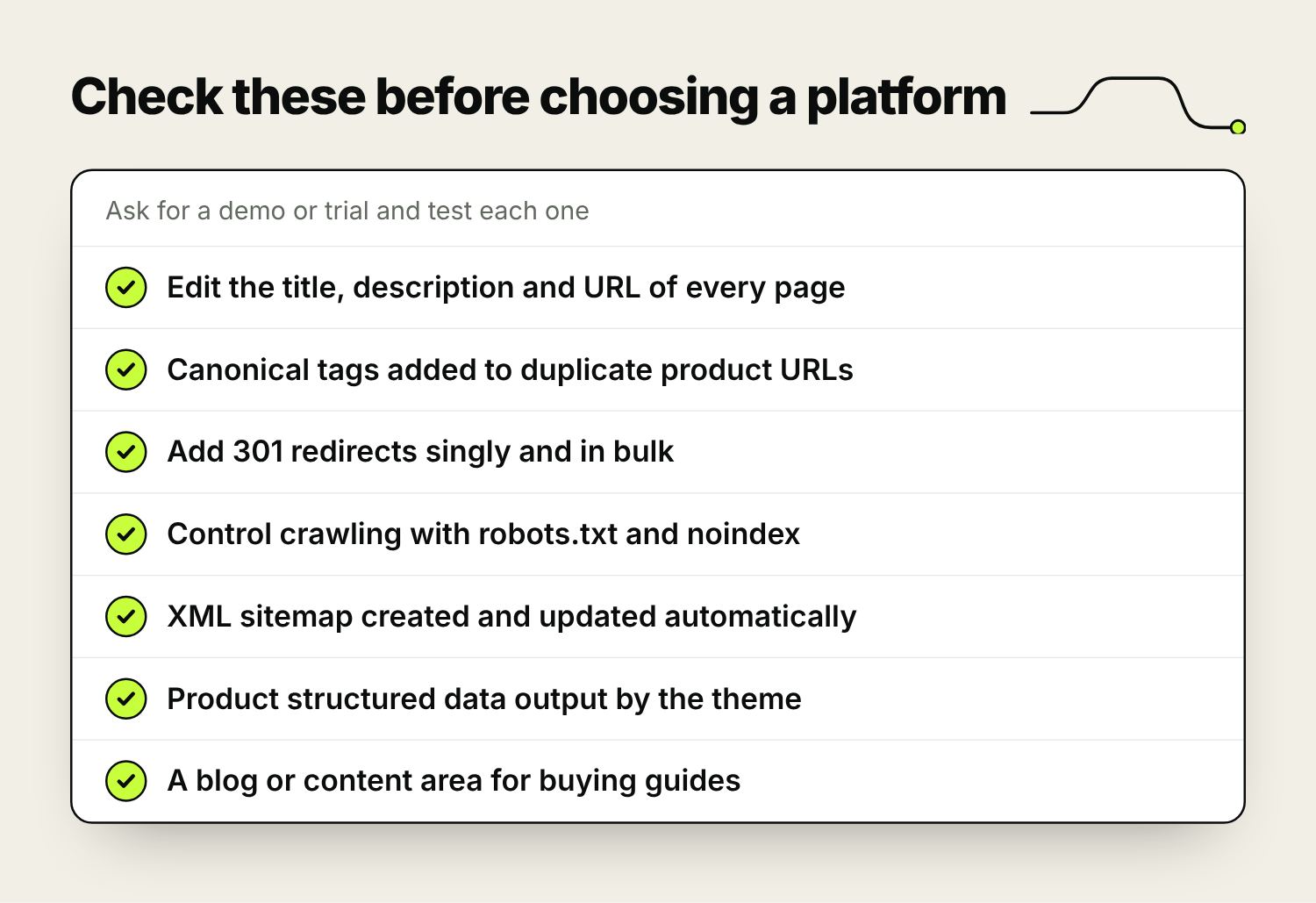
You should be able to edit the title tag, meta description, main heading and URL of every product, category and content page. Category pages matter most here, because they target the broader searches (“oak dining tables”, “women’s running shoes”) that bring in the most buyers.
Duplicate pages and crawling
Online shops create duplicate URLs without anyone meaning to: the same product reached through two categories, colour and size variants, filters, sorting options and tracking parameters. A good platform adds canonical tags that tell Google which version is the main one, and lets you control what gets crawled through robots.txt and noindex settings. It should also generate an XML sitemap and keep it up to date as products come and go.
Redirects
Products get discontinued, categories get renamed and sooner or later you’ll change platform. Each time, old URLs need a 301 redirect to their new home so you keep the rankings and links they’ve earned. You want to be able to add redirects one at a time and upload them in bulk.
Speed on a phone
Many shoppers will see your store on a phone first. Hosted platforms handle servers and caching for you, so speed mostly comes down to the theme, the apps you add and the size of your images. On self-hosted platforms, the hosting itself is your responsibility too.
Structured data and content
Product structured data tells Google the price, availability and review rating of each product, which can show in search results. Check the theme outputs it. You also need somewhere to publish buying guides, care advice and comparisons, because those pages answer the questions people search before they’re ready to buy.
The platforms compared
Features change, so test anything that would be a deal-breaker in a demo or trial before you commit.
| Platform | Hosting | URL control | robots.txt | Blog | Best for |
|---|---|---|---|---|---|
| Shopify | Hosted for you | Editable handles, fixed /products/ and /collections/ prefixes | Editable through a theme template | Basic | Most small and medium retailers |
| WooCommerce | You choose and manage it | Full control | Full control | WordPress, the strongest here | Content-led stores with support on hand |
| BigCommerce | Hosted for you | Choice of URL patterns, including short ones | Editable in settings | Basic | Larger catalogues that want a hosted platform |
| Adobe Commerce (Magento) | You or Adobe | Full control | Full control | Needs an extension | Large, complex stores with a development budget |
| Squarespace | Hosted for you | Editable slugs, fixed product URL pattern | Not editable | Good | Small ranges, design-led brands |
| Wix | Hosted for you | Editable slugs | Editable | Good | Small ranges, owner-managed sites |
Shopify
Shopify is hosted, so the servers, security, SSL certificate and software updates are looked after for you. Every product, collection, page and blog post has fields for the title tag, meta description and URL handle. It builds the XML sitemap automatically, adds canonical tags to product pages, and when you change a URL handle it offers to create the 301 redirect for you. You can also import redirects in bulk from a spreadsheet, which is a big help when moving from another platform.
For most owners the bigger advantage is what you don’t have to do. A store on a well-built theme, with sensibly sized images and a short list of apps, is quick enough out of the box, and there are no plugins or servers to patch.
Where it falls short:
- URLs have fixed prefixes. Products sit under /products/, categories under /collections/ and pages under /pages/, and you can’t remove them. Stores rank well with them, but it puts off people coming from platforms with shorter URLs.
- Many themes link to products through collection paths, such as /collections/chairs/products/oak-chair. The canonical tag points Google to the main /products/ URL, so this is rarely a ranking problem, but it’s tidier to have the theme link to the canonical version.
- Tag filtering on collections, and some filter apps, can create lots of thin near-duplicate pages. Check what’s indexed in Search Console’s Pages report.
- robots.txt can be changed, but only through a theme template, so it needs someone who knows what they’re doing. You don’t get server log files.
- The built-in blog is basic. It’s fine for buying guides and news, and limiting if content is your main way of being found.
- Deeper checkout changes are mostly reserved for Shopify Plus, and using a payment provider other than Shopify Payments adds a Shopify transaction fee. Neither is an SEO issue, but both come up in the decision.
Best for most small and medium UK retailers, especially owner-run businesses without an in-house developer. It’s what we recommend for most new stores.
WooCommerce
WooCommerce is a free plugin that turns a WordPress site into a shop. Because it runs on WordPress, it has the best content tools of any option here, and it gives you complete control. You set the URL structure in the permalink settings, edit robots.txt directly, add redirects, and use an SEO plugin such as Yoast SEO or Rank Math to manage titles, descriptions, sitemaps and structured data.
You also choose your own hosting. That means access to server logs, a staging copy of the site for testing changes (most good WordPress hosts include one), and as much speed as you’re prepared to pay for.
Where it falls short:
- You’re responsible for hosting, security, backups and updates to WordPress, WooCommerce, the theme and every plugin. Out-of-date plugins are a common way for WordPress sites to get hacked.
- Speed depends on your host and on how many plugins you add. Cheap shared hosting and a heavy page builder make for a slow shop.
- Product and category URLs include /product/ and /product-category/ by default. You can rename these in the settings; removing them altogether needs a plugin and care with redirects.
- SEO plugins overlap and clash if you install more than one. Choose one and stick with it.
Best for content-led stores, businesses already running on WordPress, and anyone who wants full control and has a developer or agency to look after it.
BigCommerce
BigCommerce is hosted like Shopify but gives you more say over URLs. You can pick the URL pattern for products and categories in the settings, including short URLs without a fixed prefix, edit robots.txt from the control panel, and import 301 redirects in bulk. It doesn’t charge transaction fees on any plan, whichever payment provider you use, and it tends to include more as standard, so you rely less on apps.
Where it falls short:
- Plans have annual online sales limits. Go over yours and you move up to a dearer plan, so the cost rises with turnover.
- Fewer UK retailers use it than Shopify or WooCommerce, so there’s a smaller pool of themes, apps and UK developers to choose from.
- The blog is basic, and like the other hosted platforms it doesn’t give you server logs.
Best for growing retailers with larger or more complicated catalogues, such as lots of variants or separate trade pricing, who want a hosted platform with more control than Shopify gives.
Adobe Commerce (Magento)
Magento comes in two versions: Magento Open Source, which is free to download, and Adobe Commerce, the paid version Adobe has sold since it bought Magento in 2018. Both give you full control over URLs, canonical settings, filtered navigation, robots.txt and set-ups with several stores, countries or languages. In experienced hands it can be excellent for SEO.
Where it falls short:
- It needs specialist developers and good hosting, and both cost more than for anything else on this list.
- Filtered (layered) navigation can create huge numbers of crawlable URLs unless it’s configured carefully.
- There’s no blog as standard. Most stores add an extension or run a separate WordPress blog.
- Product URLs end in .html by default. That’s harmless, but changing it later means a redirect for every product.
- Magento 1 stopped getting official updates in June 2020. If your store still runs on it, a move is overdue.
Best for large catalogues, several stores or countries, complicated integrations with stock and accounts systems, and a budget for ongoing development.
Squarespace and Wix
Both are hosted website builders with ecommerce built in. They suit businesses where the shop is a small part of the site, or a small range where design and brand matter more than catalogue size. Both let you edit page titles, descriptions and URL slugs, create sitemaps automatically and set up 301 redirects (Squarespace calls them URL mappings).
Wix has added a lot of SEO controls over the last few years, including an editable robots.txt, custom structured data and a bulk redirect manager. Squarespace has a good blog, but you can’t edit robots.txt and product URLs follow a fixed pattern.
Where both fall short is scale. As a range grows into hundreds of products with variants, filters and product feeds for Google Shopping, the dedicated platforms handle it better. If you sell a dozen products alongside a service business, either is fine. If you plan to sell hundreds, start on Shopify or WooCommerce rather than migrating later.
Which platform suits which business
- A small range, a design-led brand and an owner who updates the site: Squarespace, Wix or Shopify.
- A small to medium range and no in-house developer: Shopify.
- Content is how customers find you, or the business already runs on WordPress: WooCommerce.
- A large catalogue with lots of variants or trade customers: BigCommerce or Shopify Plus.
- Several countries, complicated integrations and a development budget: Adobe Commerce or Shopify Plus.
If two options look equal, choose the one you or your agency can run well, because a store that’s kept up to date and improved every month will outrank a neglected one on any platform. If you’re planning a new store, our website design page covers how we build them.
What matters more than the platform
Once the platform lets you control the basics, rankings come down to the work you put in. For most stores that means:
- Category pages with a short, useful introduction, clear filters and links to related categories.
- Product descriptions you’ve written yourself, rather than the manufacturer’s copy that dozens of other shops use.
- Fast pages: compressed images, a lean theme and only the apps or plugins you use.
- Buying guides and comparisons that answer what customers ask before they buy.
- Links from suppliers, trade bodies, local press and bloggers in your niche.
Our guide to SEO for ecommerce websites goes through each of these in detail, and our ecommerce SEO service covers the same ground for stores that want it done for them.
Switching platforms without losing rankings
Most of the damage in a platform move comes from URLs that change without a redirect. The new platform almost always uses a different URL structure, so every product, category, page and blog post that has rankings or links needs mapping to its new address.
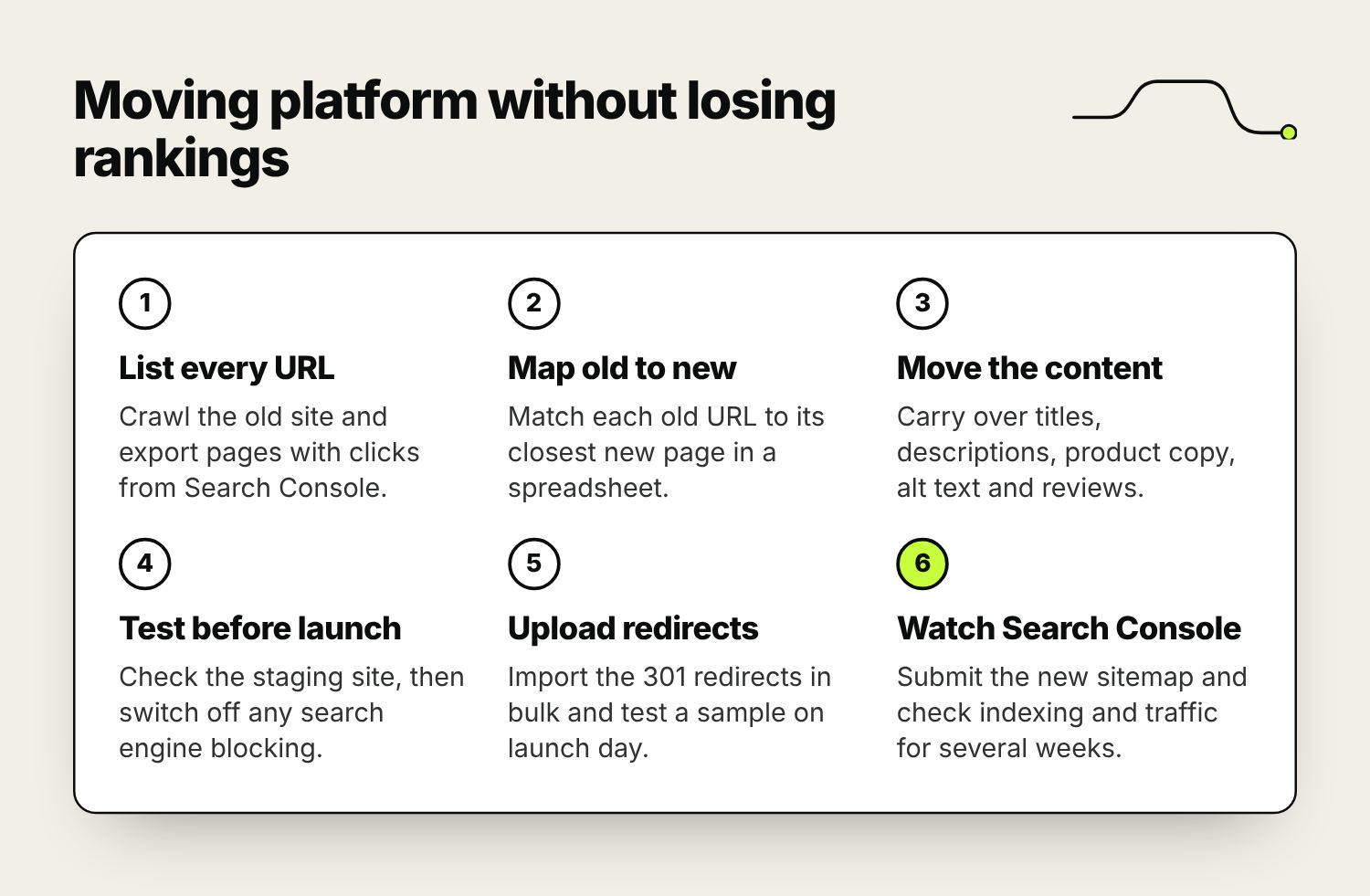
Check the new platform can import products, customers and redirects in bulk from a spreadsheet; moving a large catalogue by hand invites mistakes. Build and test on a staging site or unpublished theme, and make sure any “hide from search engines” setting used during the build is switched off at launch. It’s normal to see some movement in rankings for a few weeks afterwards. A drop that lasts usually points to missing redirects or content that didn’t make the move.
Frequently asked questions
What is the best ecommerce platform for SEO?
For most small and medium UK retailers, Shopify. It handles hosting, sitemaps, canonical tags and redirects for you and gives you editable titles, descriptions and URLs on every page. WooCommerce gives more control and better blogging if you have someone to maintain it. BigCommerce and Adobe Commerce suit larger, more complex catalogues.
Is Shopify or WooCommerce better for SEO?
Both can rank well. Shopify is easier to keep in good shape because hosting, security and updates are handled for you, but its URL structure is fixed and its blog is basic. WooCommerce gives full control over URLs, robots.txt and content, but speed and security depend on your hosting and on someone keeping WordPress and its plugins updated.
Is Shopify bad for SEO because of its URL structure?
No. The fixed /products/ and /collections/ prefixes look untidy to some people, but plenty of Shopify stores rank at the top of Google with them. Shopify adds canonical tags so duplicate product URLs point to one version. Category content, product descriptions, speed and links matter far more than the prefix.
What is the best ecommerce CMS for a small business?
If you mainly sell products and don’t have a developer, Shopify. If the shop sits alongside a content-heavy site, or you already run WordPress, WooCommerce. If you sell a small range as part of a service or design-led brand, Squarespace or Wix can be enough, though you may outgrow them as the range grows.
Will changing ecommerce platform hurt my rankings?
It can, and the usual cause is missing redirects rather than the new platform. Map every old URL to its new home, carry over titles, descriptions and product content, upload 301 redirects in bulk and test them on launch day. Some movement in the first few weeks is normal; a lasting drop usually points to redirects or content that didn’t make the move.
Is Wix or Squarespace good enough for an online shop?
For a small range, yes. Both let you edit titles, descriptions and URL slugs, generate sitemaps and add redirects, and Wix now lets you edit robots.txt and structured data. They are weaker for large catalogues with lots of variants, filters and product feeds, so if you expect to sell hundreds of products, start on a dedicated ecommerce platform.

Founder of The Pursuit Agency in Swindon. He has worked in SEO for fifteen-odd years and leads the agency's SEO and Google Ads work for owner-led businesses across the UK.